Turn scope into structured execution
Break commitments into phases, milestones, tasks, dependencies and owners so everyone understands what needs to happen before delivery can move forward.
Plan work, coordinate milestones, manage dependencies, balance workloads, surface blockers and keep customers informed, all around one shared project and customer context.
Built for teams delivering customer implementations, operational projects, consulting engagements, Solar EPC work and internal initiatives, with every milestone, dependency, decision and next action clearly owned.
Projects rarely fail because a task list is missing. automateCRM connects milestones, dependencies, people, decisions, customer commitments, blockers and handoffs so teams know what is due, what is at risk and what needs attention next.
Break commitments into phases, milestones, tasks, dependencies and owners so everyone understands what needs to happen before delivery can move forward.
Use Gantt schedules, dependency paths and critical-path visibility to understand where one delay can affect the wider delivery plan.
Keep ownership, workload, meetings, decisions and follow-ups visible so project execution does not fragment across personal trackers and conversations.
Share meaningful progress, milestones and updates without creating a separate reporting process every time the customer asks what is happening.
From project kickoff to completion, automateCRM brings planning, ownership, dependencies, collaboration, customer visibility and operational intelligence into one configurable execution system.
Turn repeatable delivery models into projects teams can start with clarity.
Create projects around the way your business delivers, using repeatable structures for common project types while retaining enough flexibility for customer-specific requirements.
Turn project commitments into owned work with clear completion points.
Break delivery into tasks, subtasks and milestones so teams can execute day-to-day work without losing sight of the commitments the project is meant to deliver.
See how project work connects before one delay affects everything downstream.
Use visual scheduling, dependencies and critical-path context to understand which activities determine delivery timing and where delays can create wider project impact.
See where delivery capacity is healthy and where the team is being stretched.
Give delivery managers visibility into who is carrying what work so shifting priorities and overloaded contributors can be addressed before execution slows down.
Surface what can derail delivery while there is still time to act.
Bring delayed work, dependency exposure, blockers and readiness gaps into the project view so teams can intervene before customer commitments are affected.
Keep conversations, decisions and follow-ups attached to the work they affect.
Connect meetings, notes, decisions and follow-up actions to project context so teams understand why something changed and what needs to happen next.
Give customers useful project visibility without creating another reporting workload.
Expose the right level of progress, milestones, meetings and documents while keeping customer-facing visibility connected to actual internal execution.
Carry commitments forward when ownership moves between teams.
Keep information established before, during and after delivery connected so sales, delivery, billing, support and service teams do not have to reconstruct the customer every time ownership changes.
Automate coordination around the work while keeping delivery decisions human.
Use configurable workflows to create tasks, notify owners, escalate delays and coordinate cross-functional actions while project managers remain responsible for delivery decisions.
Help teams understand what changed, what is blocked and what deserves attention.
Use practical AI to summarize project activity, explain recent movement and surface delivery concerns so managers can regain context quickly and focus attention where it matters.
Turn schedules, milestones and execution history into delivery intelligence.
Move beyond project status labels. Analyse progress, delays, milestone performance and execution patterns so delivery managers know where intervention is needed.
Shape project execution around the way your business actually delivers work.
Different businesses structure projects, milestones, approvals, customer visibility and delivery checkpoints differently. Configure automateCRM around the execution model you want teams to follow.
A project is one stage in a wider customer relationship. A governed process can move work from a customer commitment into delivery while preserving the decisions and context needed by billing, support, service and future growth.
Because automateCRM is a Unified CRM and Customer Operations Platform, that context can remain connected around the same customer instead of disappearing when the project closes.
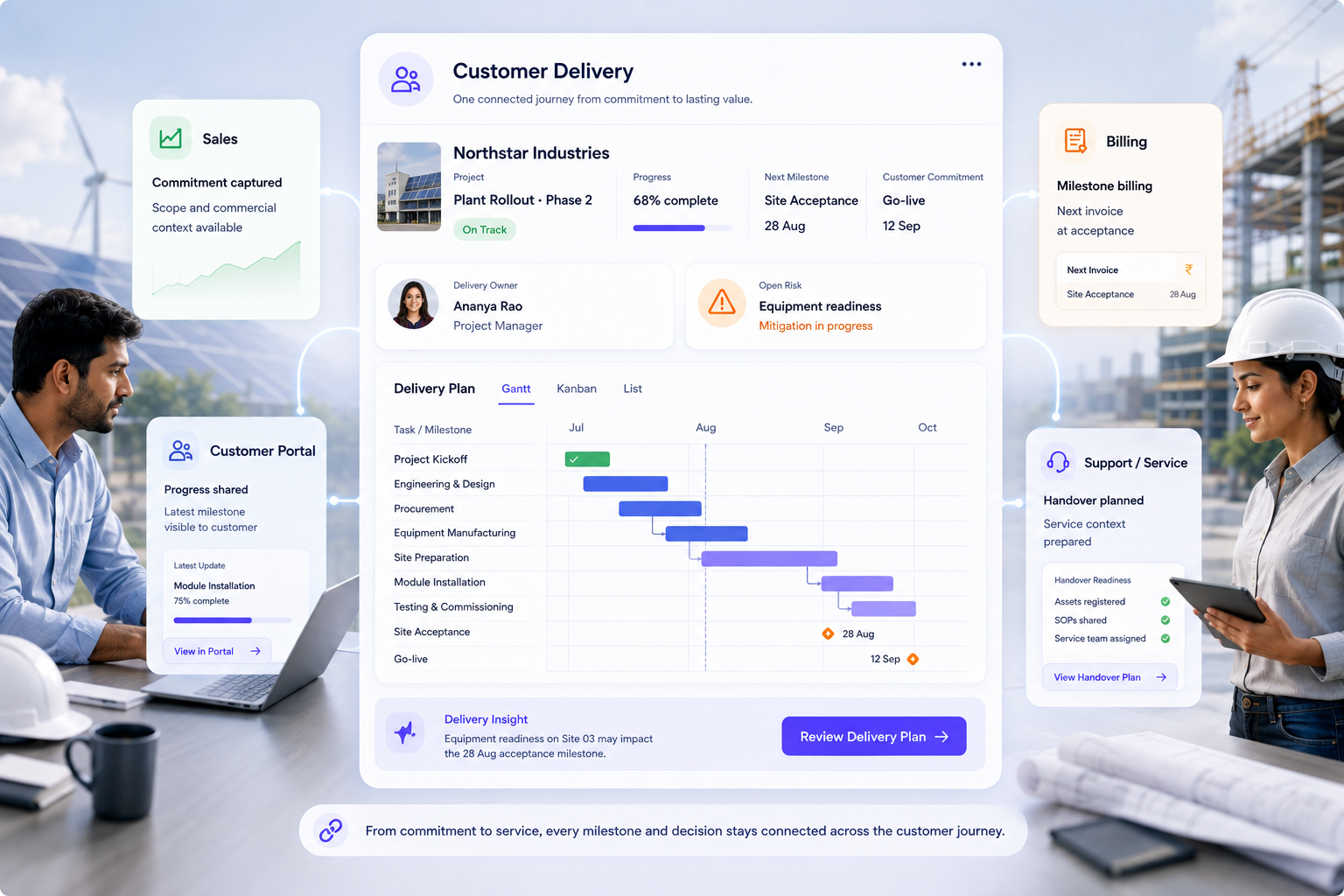
automateCRM does not force every job through the same generic CRM interface. Processes can open the record, guided form or purpose-built business screen needed for that step, with the relevant customer and process context already in place.
The impact goes beyond better task tracking. Teams see delivery risk earlier, ownership becomes clearer, customers stay better informed and project history becomes useful across the wider customer journey.
Shared milestones, ownership and customer context reduce the information loss that normally happens when work moves between teams.
Dependencies, critical path, overdue work and blockers make schedule exposure visible before the customer experiences the missed commitment.
Clear ownership, milestones and project activity help contributors focus on the work that actually moves delivery forward.
Visibility across projects and contributors gives delivery managers a better basis for prioritization when capacity becomes stretched.
Clear progress, milestone visibility and customer-facing updates reduce the repetitive effort required to explain where delivery stands.
Project history, delays and execution patterns create a stronger basis for planning future work and refining repeatable delivery models.
See how automateCRM can bring project planning, milestones, Gantt schedules, dependencies, workload, customer updates, automation and project intelligence together around the way your business delivers work.
Bring project managers, delivery teams, specialists, customer-facing teams and leadership into the process without making per-user pricing a barrier.
Continue from sales into project delivery, billing, inventory, support, field operations and service without rebuilding customer context at every handoff.
A few quick answers about planning, dependencies, workload, customer visibility, automation and delivery intelligence.
Yes. Project structures can support internal execution as well as customer-facing delivery, while selected progress and customer information remain connected to the same underlying project.
Yes. Teams can visualize schedules using Gantt timelines, connect dependent activities and use critical-path context to understand which work can affect delivery timing.
Yes. Repeatable project structures can be used for common implementations, rollouts or operational delivery so teams can start from an established execution model.
Yes. Project ownership and workload visibility help delivery managers understand where commitments are concentrated and where competing priorities may need intervention.
Yes. Customer-facing project views can expose relevant progress, milestones, meetings and documents without exposing internal-only project information.
Yes. Because projects are part of the same automateCRM environment, delivery progress and customer context can remain connected to downstream billing, fulfilment, support and service processes.
AI can help summarize recent project activity, surface blockers, explain milestone movement and make important delivery signals easier to understand. The focus is practical assistance while project ownership remains with the team.
Yes. Project structures, fields, views, workflows, notifications, customer visibility and connected processes can be configured around different delivery models.
Bring us your most pressing operational challenge. We'll explore how the right workflows, interfaces, integrations, automation and agentic AI can come together around it.