Capture every issue in context
Bring requests from calls, email, WhatsApp, customer portals, field teams and internal service events into one structured service process.
Capture issues across channels, manage tickets and SLAs, coordinate field service, track contracts and assets, automate follow-ups and use practical AI to help teams resolve faster, all around one shared customer context.
Built for businesses where service spans customer conversations, support desks, field teams, assets and recurring service commitments, with every case, visit, escalation and next action clearly owned.
Support rarely happens inside a ticket alone. automateCRM connects conversations, cases, SLAs, contracts, assets, field visits, service history, feedback and follow-up actions so your team always knows what happened, what is due and who owns the next step.
Bring requests from calls, email, WhatsApp, customer portals, field teams and internal service events into one structured service process.
Use priorities, SLA policies, ownership and escalation rules to make response and resolution commitments visible before they are missed.
Keep support agents, technicians, customer visits, service outcomes and required follow-ups connected around the same case.
Capture resolution, customer feedback and recurring issue patterns so every completed case can improve the next service interaction.
From the first customer request to field resolution, recurring service and feedback, automateCRM brings the people, commitments, customer history and operational work behind service into one configurable system.
Turn every customer issue into a clearly owned path to resolution.
Bring customer requests into a structured case process where agents can see the issue, customer history, ownership, activity and resolution path without piecing context together across separate tools.
Let the channel change without losing the customer conversation.
Customers may call, email, send a WhatsApp message or raise a request through a portal. Keep those interactions connected to customer and service context instead of creating disconnected histories for every channel.
Make service commitments visible before they become breaches.
Define service expectations around response and resolution, make approaching deadlines visible and escalate cases when service commitments are at risk.
Know what service the customer is entitled to before work begins.
Give support teams visibility into AMC coverage, warranty status and service commitments so they can understand what applies to the customer before committing work.
Support the equipment and installed base, not just the ticket around it.
When service revolves around equipment, machines or installed products, keep the asset, customer, service history, warranty and related cases connected in one context.
Move cases from the service desk to on-ground resolution without losing context.
Coordinate technician visits and on-ground service execution while keeping the case, customer history and service commitment visible to everyone involved.
Turn recurring service commitments into planned, measurable execution.
Structure preventive and recurring service work around customer assets, contracts and planned schedules so important maintenance does not depend on spreadsheets or individual memory.
Give customers a clear place to raise, track and understand service requests.
Extend selected service workflows to customers so they can raise requests, see progress and access useful information without relying on repeated calls or emails.
Put useful context and the right answer next to the case when agents need it.
Use customer history, service context and your knowledge base to reduce repetitive investigation, make information easier to find and help agents move confidently toward resolution.
Measure how the customer experienced the resolution, not just whether the case closed.
Connect customer feedback to the case, service team and resolution experience so managers can see where service is working and where follow-up is needed.
Automate the repetitive work around resolution while keeping people in control.
Use configurable workflows and Agentic Process Automation to coordinate assignment, follow-ups, communication, escalations and cross-team actions without turning service into a rigid script.
Turn tickets, SLA performance and service patterns into decisions.
Move beyond ticket counts. Understand backlog, ageing, SLA performance, repeat issues, customer feedback and field execution so managers know where service operations need intervention.
A service issue is easier to resolve when the team already knows what was sold, what was promised, what asset is installed, what service coverage applies, what happened before and what other work is already in progress.
An all-in-one CRM keeps shared customer context across sales, delivery and support instead of forcing the service team to reconstruct it every time a new case is raised.
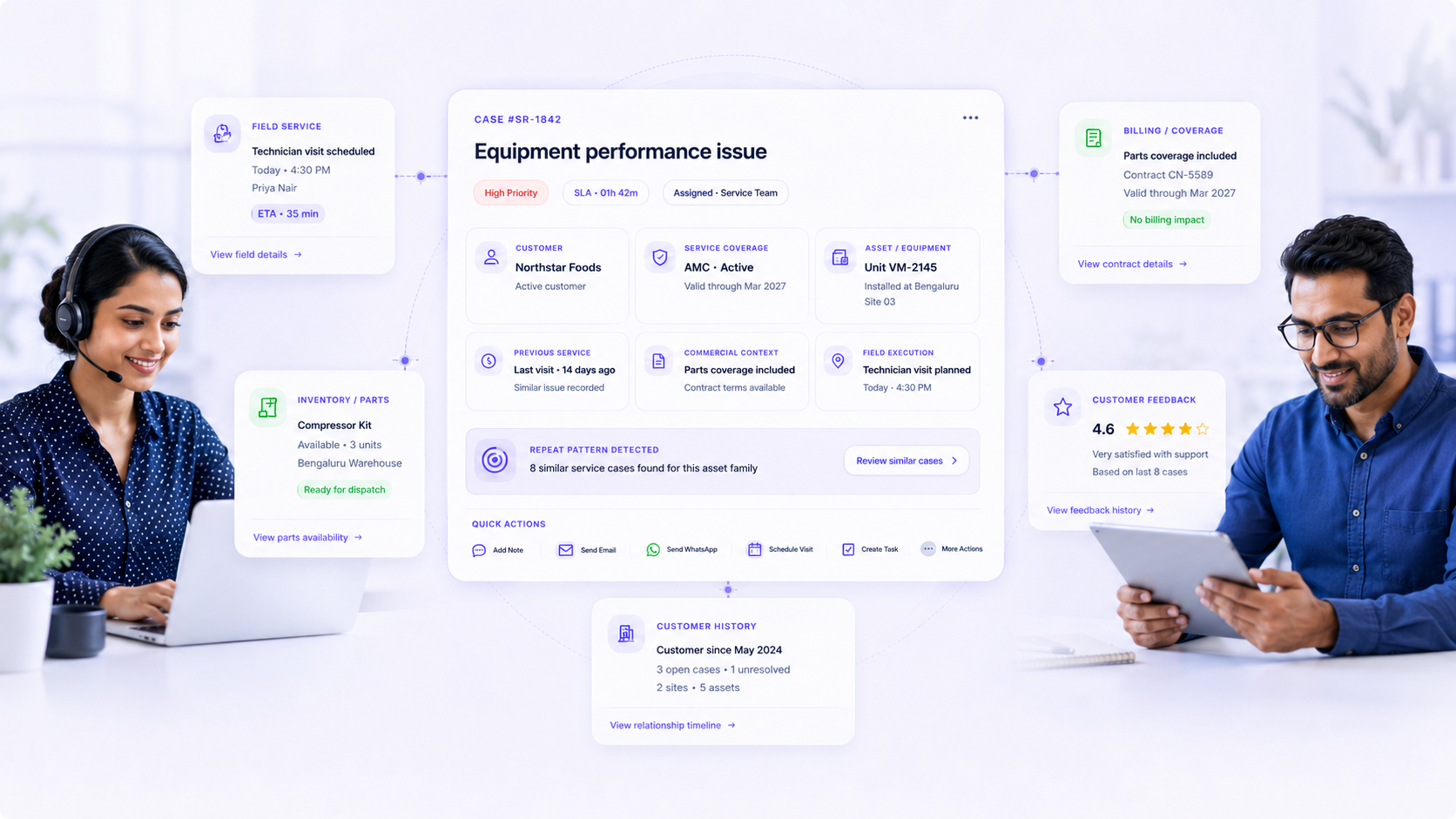
automateCRM does not force every job through the same generic CRM interface. Processes can open the record, guided form or purpose-built business screen needed for that step, with the relevant customer and process context already in place.
The impact goes beyond faster ticket closure. Teams respond with more context, protect service commitments, coordinate field work more cleanly and turn every resolution into useful service intelligence.
Customer history, prior service activity, contracts and related operational context reduce the time spent rediscovering what happened before.
Visible deadlines, ownership and escalation rules make service risk easier to identify before a response or resolution target is missed.
Cases, technician visits, service outcomes and next actions remain connected instead of fragmenting across separate operational trackers.
Connected case, asset and service history makes recurring problems easier to recognise before they become a pattern customers repeatedly experience.
Shared context, knowledge and structured service processes help teams deliver a more predictable experience across agents, channels and locations.
SLA performance, recurring issues, field execution and customer feedback provide managers with a clearer basis for operational improvement.
See how automateCRM can bring ticketing, SLA management, customer conversations, service contracts, assets, field execution, preventive maintenance, AI assistance and feedback together around the way your business supports customers.
Bring support agents, service managers, field technicians and leadership into the process without making per-user pricing a barrier.
Continue from sales and onboarding into service, billing, inventory, field operations, loyalty and analytics without rebuilding customer context.
A few quick answers about helpdesk operations, SLA control, field service, contracts, assets, self-service and practical AI.
Yes. Support agents, service managers and field technicians can work around the same customer and case context, with ticketing, SLA tracking, technician visits, field updates and service history connected to the same process.
Yes. Response and resolution policies can be monitored against service conditions, with notifications, escalation workflows and ownership changes triggered when defined thresholds are at risk.
Yes. Contract, AMC and warranty context can be connected to customers, assets and service activity so teams can understand applicable service coverage while handling the case.
Yes. Service issues can be linked to customer assets or installed equipment, allowing teams to retain service history, warranty context and recurring issue information around the asset being serviced.
Yes. Customer portal and self-service flows can allow customers to raise requests, see relevant status information and access knowledge while keeping portal activity connected to the underlying CRM record.
Yes. Preventive and recurring service activity can be planned around customers, contracts and assets, with scheduled visits, completion tracking and service history retained in the same platform.
AI can help summarize service history, surface relevant knowledge, assist with response preparation, identify useful patterns and support repetitive self-service flows. The focus is practical assistance inside the service process while keeping people responsible for customer outcomes.
Yes. Fields, layouts, statuses, queues, workflows, SLA policies, approvals, notifications and related processes can be configured around different service teams, customers, products and operating models.
Bring us your most pressing operational challenge. We'll explore how the right workflows, interfaces, integrations, automation and agentic AI can come together around it.